Generate and Install the Helyx License Certificate
To ensure seamless operation of Helyx, users are required to generate a certificate.
The following process must be followed to obtain the certificate :
- An initial certificate valid for 30 days is available free of charge.
- After the initial 30-day period, users are required to pay the applicable licensing fee to generate a new certificate valid for 365 days or monthly or quarterly basis.
Please follow the outlined steps to complete the certificate generation process :
1. Extract the Certificate Utility
After downloading the Helyx zip file, extract its contents.
Note
The certificate utility helyx-license executable will be included in the extracted files.
2. Run the Certificate Utility
Execute the certificate utility. Upon running, it will display your Activation Key.
./helyx-license --generate-key3. Save Your Activation Key
Copy the Activation key and keep it in a secure location. You will need this for license generation.
4. Access the License Portal
Go to - Helyx website and log in using your registered email and password.
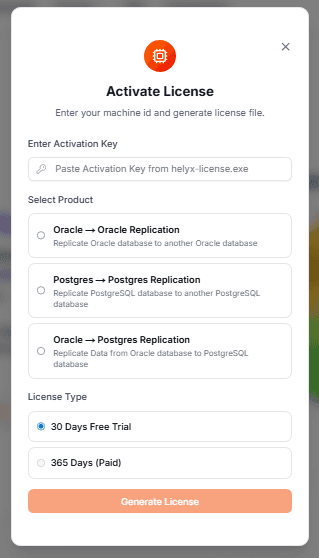
5. Generate the License File
- Enter the Activation Key obtained from step 2.
- Select the product type as prompted.
- Choose the appropriate license option timeline.
- Click to generate the license file.
6. Download and Install the License
- Download the generated license file (provided as a zip file) to your system.
- Transfer the downloaded file to server and Unzip license file.
- Create directory /var/lib/helyx/runtime and /var/lib/helyx/license and provide 775 permission to the above two directories.
7. Run the below command
<path_to_helyx-license.exe> --store-certificate -connectpath <path_to_connect.crt> -keypath <path_to_keystore.jks> -trustpath <path_to_truststore.jks> -capath <path_to_ca.crt> -licencepath <path_to_license.dat>8. Complete Setup
After completing these steps, Helyx is ready for use with a valid license.
Check license validity :
You can check your license validity using the command below:
./helyx-license --check-license-validity